Before you generate
Know the message, the shot you need and how it fits into the video.
Turn scattered AI clips into a repeatable production workflow—with a 20-page guide covering prompts, shot planning, quality checks and a practical 30-day calendar.
One-time purchase · Digital PDF · No recurring guide fee
See the four sample videos before you decide ↓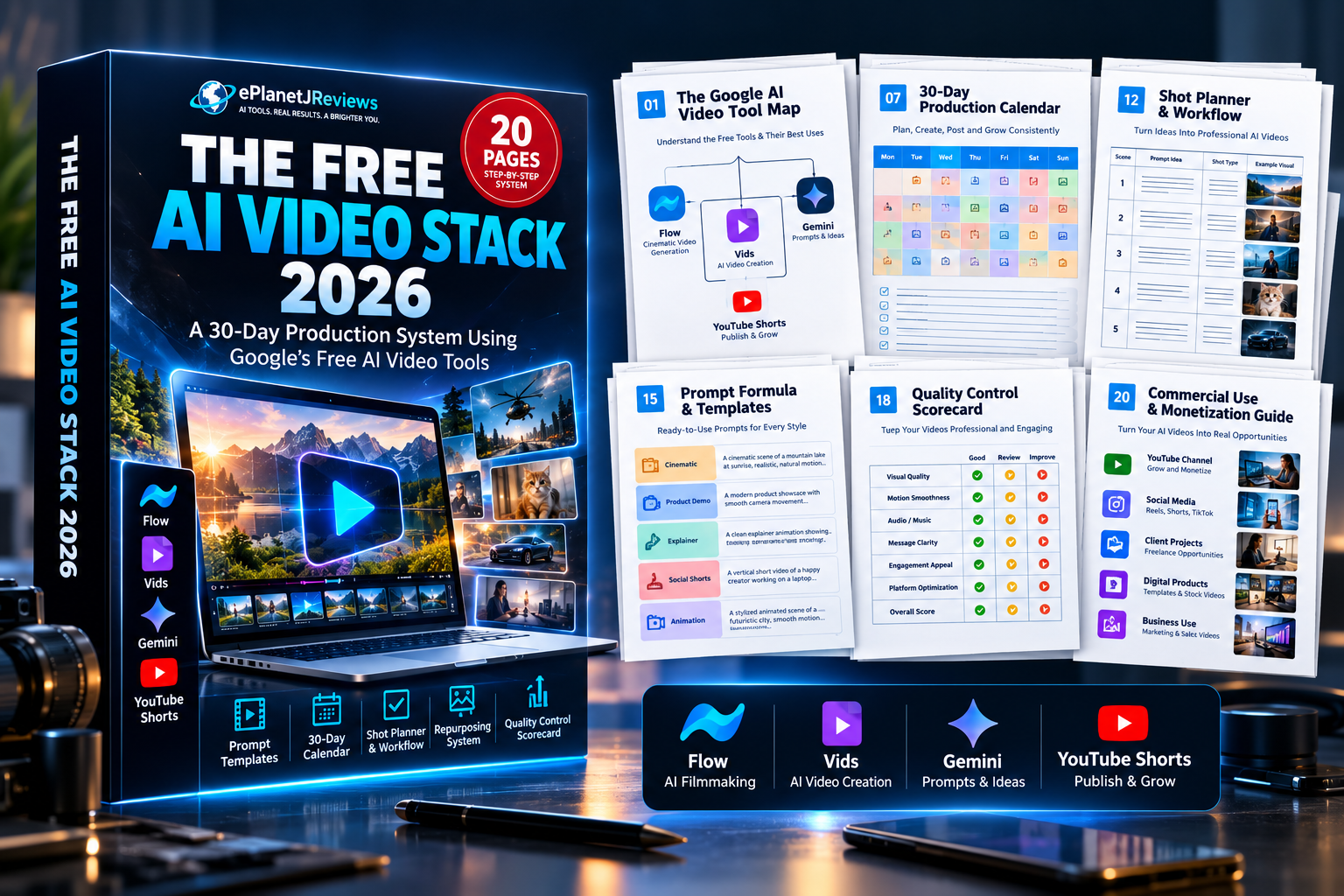
You open a generator, try a prompt and get something interesting. Then you need a stronger opening, a matching second shot, a usable transition—and a reason for someone to keep watching.
That is where the guessing starts. Another prompt. Another generation. Another folder of clips that never becomes a finished piece.
Know the message, the shot you need and how it fits into the video.
Use a repeatable prompt structure rather than rebuilding every request from scratch.
Review usable footage, make your edits and check the finished video against its purpose.
This guide gives those decisions a structure you can return to.
Watch the four supplied examples, then explore the planning resources below. These are examples—not a promise of identical output from every tool or account.
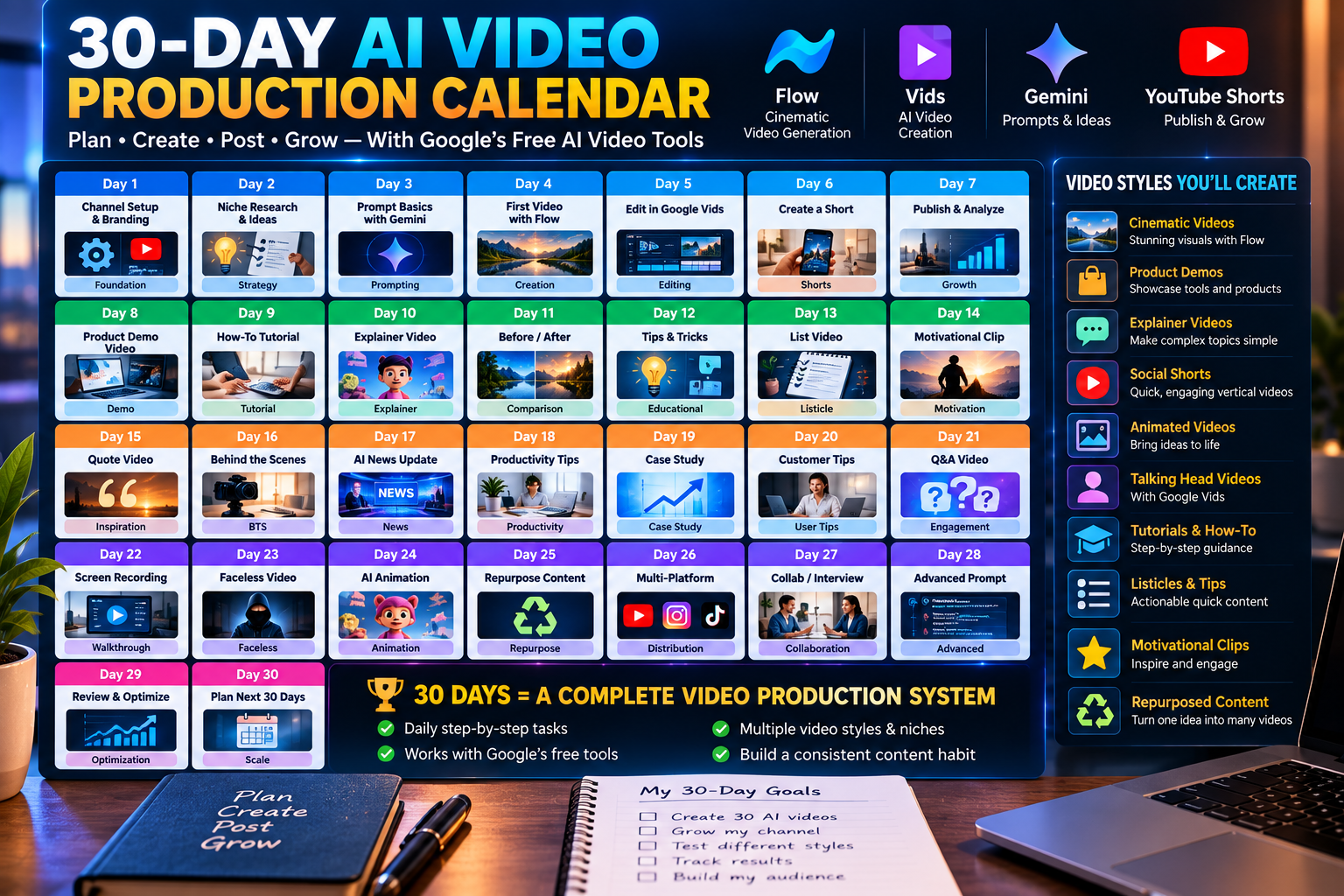
Stop generating random clips. Follow a deliberate month-long production plan with daily structure, shot-focused planning and review.
Use the calendar to decide what to work on next, keep production organized and review what needs to change. A schedule gives each session a purpose instead of leaving you facing a blank prompt box.
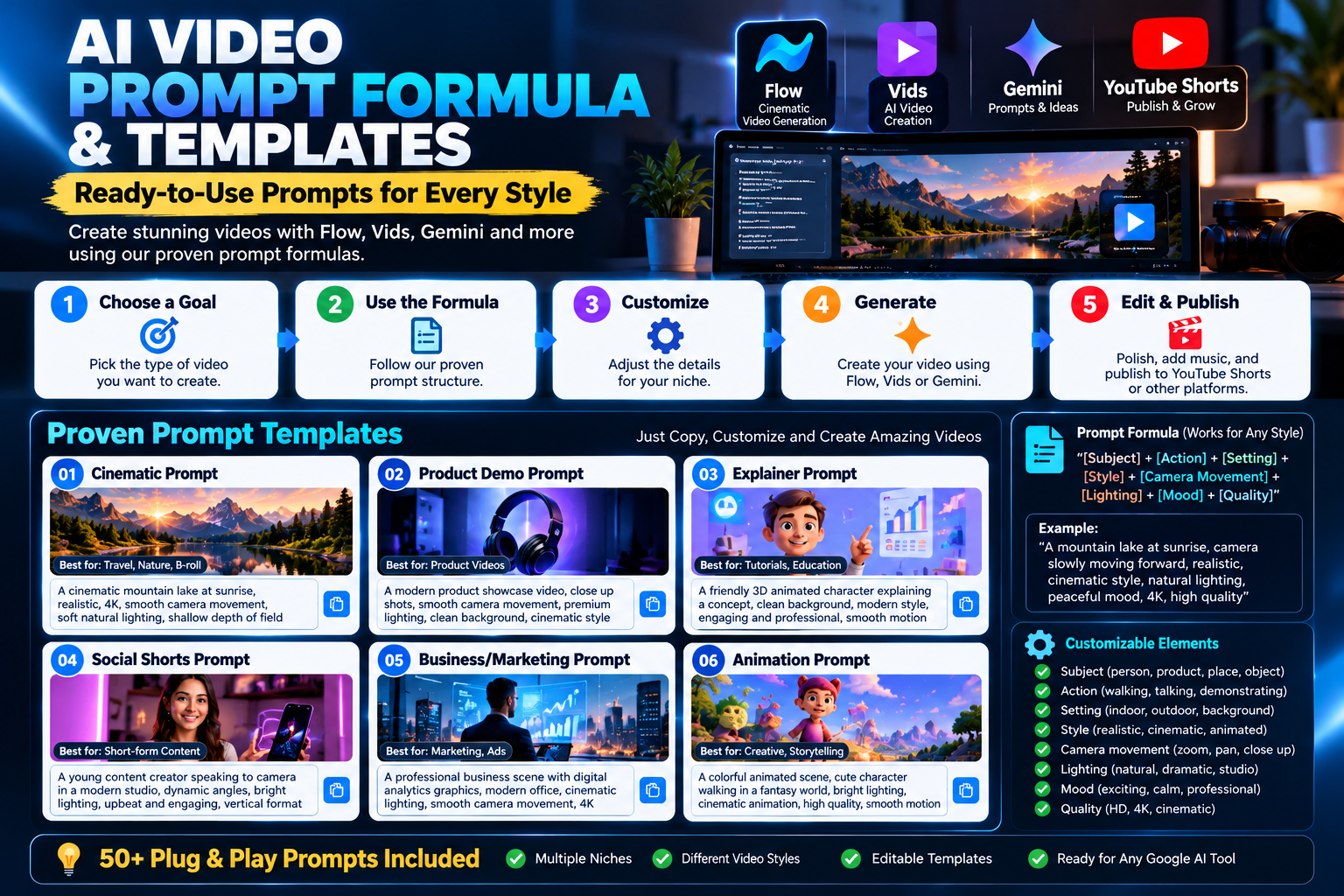
Give the generator a clearer job with a repeatable structure built around subject, action, environment, camera, lighting, style and constraints.
Work through the subject, action, setting, camera, lighting and visual style. Reuse the structure, then adjust the details for the scene you actually need.
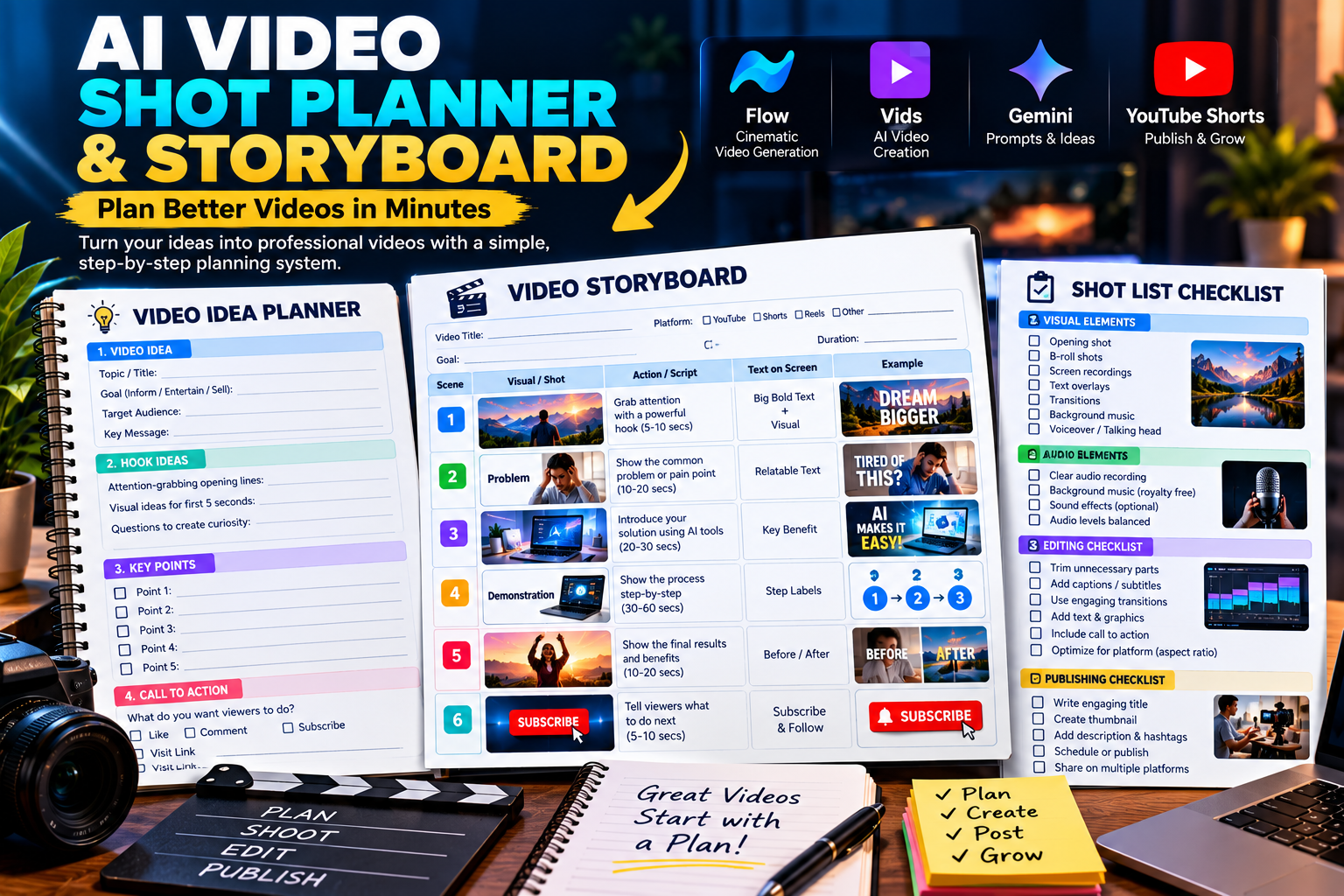
Decide what each clip needs to accomplish before spending a generation. Connect hooks, supporting shots, transitions and CTAs to the finished video.
Map the opening hook, supporting footage, transitions and call to action before generating. You can see which shots are missing before you reach the editing stage.
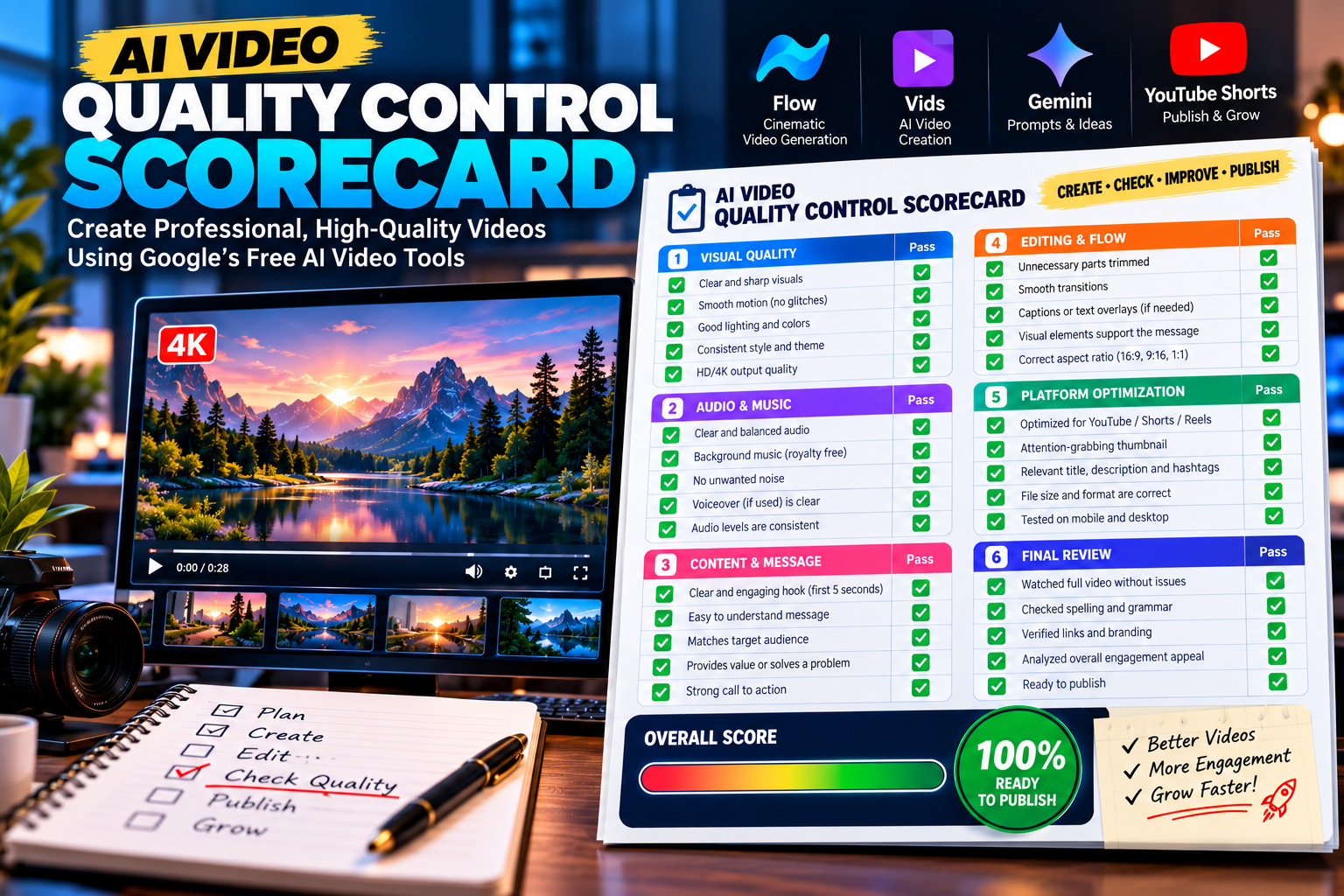
A generated clip still needs review. Check motion, composition, artifacts, message clarity, editability and platform fit before publishing.
Look for distracting artifacts, weak motion, unclear composition and footage that does not support the message. Use the scorecard to make a deliberate keep, edit or regenerate decision.
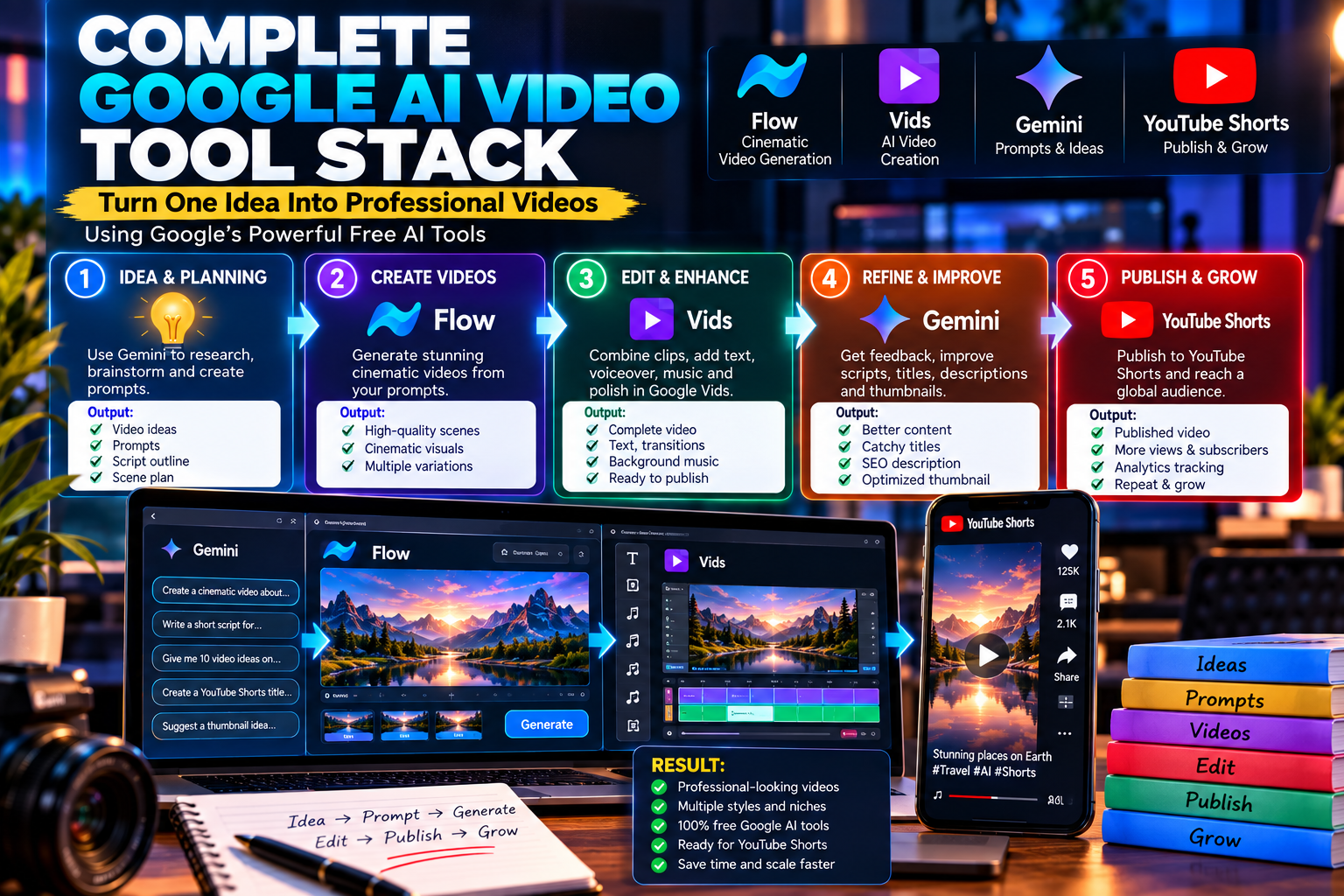
Build a workflow around the creator-facing tools available to your account: plan, generate, edit, repurpose and publish.
Move from the plan to usable clips, then into editing, repurposing and publishing. The aim is a connected process you can repeat—not a growing folder of disconnected experiments.
Your purchase is a 20-page digital PDF bringing the production framework, prompt system, shot planner, 30-day calendar, tracking, troubleshooting and quality checks into one place.
A useful fit if you have tried AI video but want a more deliberate way to plan, generate and finish your content.
Organize the scenes, supporting footage and calls to action your video needs before you begin generating.
This is an educational guide. It does not include an AI generator, editing software, a paid Google plan or extra generation credits.
The value is in the organized production process: what to plan, how to structure your prompts, what to check and what to do next. The payment is for the guide—not for access to Google’s services.
Get the complete 20-page digital production system and build a more organized AI-video workflow.
Included: 20-page PDF · 30-day production calendar · prompt framework · shot planning · quality-control guidance · tracking and troubleshooting.
No. This is an independent educational guide published by ePlanetJReviews.com.
No. The workflow focuses on creator-facing tools and interfaces.
No. Features, quotas, plans and regional availability can change. The guide focuses on making better use of access available to your account.
A 20-page digital PDF covering the production framework, prompt system, shot planning, 30-day calendar, tracking, troubleshooting and quality control.
No. The launch price is a one-time payment for the guide.
No. The guide costs $9.97 at the launch price. Its title refers to the free-access tool opportunities discussed inside. Provider access, credits and availability can change.
Neither. You receive a 20-page educational PDF and use its workflow with tools available to your account. You still plan, generate, review and edit your content.
It is an illustrative monthly planning target from the guide, not a verified allowance for every account. Check the current access and limits of each tool before planning your production around it.
Plan better. Prompt with purpose. Track what works. Turn useful generations into finished content.
Included: 20-page PDF · 30-day production calendar · prompt framework · shot planning · quality-control guidance · tracking and troubleshooting.


Because this is a digital product delivered with immediate access, all sales are final. Please review the product description, contents, sample videos, pricing and policy information on this page carefully before purchasing.
This product is an independent educational resource and does not provide special access to Google services, bypass platform restrictions, increase account quotas, or grant rights beyond those provided by the relevant platform. By purchasing and using this guide, you remain responsible for following the current terms of service, acceptable-use policies, copyright requirements, commercial-use conditions, and other applicable rules of Google and any other platform you use.
160+ videos per month is an illustrative workflow target, not a guaranteed quota or result. Free access, credits, generation limits, features, models and regional availability can change by account, tool, region and time.
All sales of The Free AI Video Stack 2026 are final. Because this is a digital product made available with immediate access after purchase, refunds are not offered. Please review the product description, included materials, sample videos, price, disclaimers and usage-policy information before completing your purchase. This policy does not limit any rights or remedies that cannot legally be excluded under applicable law.
This website and product are not affiliated with, endorsed by, sponsored by, or administered by Google LLC or Google. Google and related product names and trademarks are the property of their respective owners. Any references to Google services are for identification purposes only.
This website and product are not affiliated with, endorsed by, sponsored by, or administered by Meta Platforms, Inc., Facebook, or Instagram. Facebook and Instagram are trademarks of Meta Platforms, Inc. Any references to these services are for identification purposes only.
This product does not provide any guarantee of income, business success, traffic, views, subscribers, sales, or other results. Examples, demonstrations, workflows, or potential-use scenarios are educational and should not be interpreted as promises or guarantees. Individual results vary according to many factors.
This website may contain affiliate or referral relationships. If you purchase or use a third-party product or service through certain links, we may receive a commission, referral benefit, or other compensation where applicable, at no additional cost to you unless otherwise disclosed. Such relationships do not guarantee any result.
The information provided is for general educational and informational purposes only and is not legal, financial, tax, investment, or professional advice. AI tools, features, pricing, quotas, terms, policies, output quality, and regional availability can change. Review current provider terms and conduct your own due diligence before relying on any third-party service or using generated content commercially.
This guide is intended for lawful, ethical and policy-compliant use of AI tools. Users are responsible for reviewing and following the current terms of service, acceptable-use policies, content rules, copyright requirements, commercial-use conditions and other applicable policies of Google and any other platform they use. Do not use the workflows in this guide to create deceptive, infringing, unlawful or otherwise prohibited content. Access, features, credits, generation limits and permitted uses can change, and inclusion of a tool in this guide does not override the provider’s current policies.
The Free AI Video Stack 2026 is an independent educational resource from ePlanetJReviews.com. It does not provide special access to Google services, bypass platform restrictions, increase account quotas, or grant rights beyond those provided by the relevant platform. Each purchaser remains responsible for checking current platform rules before generating, publishing, distributing or commercially using AI-generated content.
Third-party names, trademarks, logos, and other intellectual property remain the property of their respective owners. References are made for identification and educational purposes only. Original ePlanetJReviews.com content is protected by applicable copyright law.